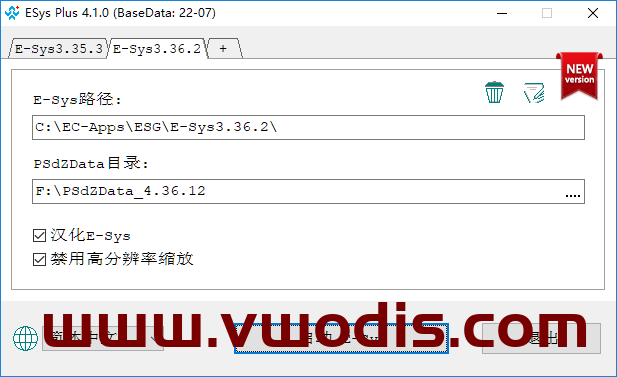
BMW【vwodis】BMW Esys Plus 4.2 Support New Data 2303
BMW【vwodis】BMW Esys Plus 4.2 Support New Data 2303
BMW【vwodis】BMW Esys Plus 4.2 Support New Data 2303
Find BMW resources for BMW vehicles, including navigation map updates, head unit firmware, ISTA diagnosis, E-Sys coding, BimmerCode tutorials, retrofit notes, programming files and practical repair solutions.
BMW【vwodis】BMW Esys Plus 4.2 Support New Data 2303
BMW【vwodis】BMW Esys Plus 4.2 Support New Data 2303
BMW【vwodis】BMW Esys Plus 4.2 Support New Data 2303
BMW【vwodis】BMW ISTA-D 4.45.30 PSdZData_Lite_4.45.30-PSdZData_Full_4.45.30
BMW【vwodis】BMW ISTA-D 4.45.30 PSdZData_Lite_4.45.30-PSdZData_Full_4.45.30
BMW【vwodis】BMW ISTA-D 4.45.30 PSdZData_Lite_4.45.30-PSdZData_Full_4.45.30
BMW【vwodis】BWM ISTA-D 4.45.21+keygen(lock computer)
BMW【vwodis】BWM ISTA-D 4.45.21+keygen(lock computer)
BMW【vwodis】BWM ISTA-D 4.45.21+keygen(lock computer)
System requirements for ISTA version 4.45.20:
1. Windows 10 v1903 or higher
2. Microsoft NET Framework 4.8. x
3. Visual C++2015-2019
4. Windows username cannot contain spaces.
ISTA-D is a diagnostic software used to diagnose all BMW models (E, F, G, I, Alpina series models), MINI, Rolls Royce, and motorcycles.
Read error codes.
Erase fault codes.
Reset service light, interval.
Read the data stream.
Complete diagnosis (including testing plan).
Monitor the current data flow and charts, as well as vehicle version information.
Reset ECU adaptation.
Replace and register a new battery.
Wiring diagrams and other functions.
Hardware requirements:
Processor (CPU): i5 2nd generation or above processors
Memory (RAM): Minimum 4GB
Hard Disk (HDD): There should be at least 500Gb-1TB of available space on the hard disk before installation
Attention: keygen locked computer
Attention: keygen locked computer
Attention: keygen locked computer
BMW【vwodis】BMW MGU18 Map-BMW MGU Master Road Map China MGU 2024-1(for all ID7)
BMW【vwodis】BMW MGU18 Map-BMW MGU Master Road Map China MGU 2024-1(for all ID7)
BMW【vwodis】BMW MGU18 Map-BMW MGU Master Road Map China MGU 2024-1(for all ID7)
Version: 2024-1
Applicable model: MGU host
Packet information:
Step 1: Determine the host version.
The main interface – map – setting – location and version – version information can distinguish whether it is a MGU host, and then whether it can be upgraded. If the version shows Road Map CHINA Live, you can upgrade it, focusing on the four letters of Live. Of course, at present, ID7 is the MGU host, which is the Live map.
Step 2: Download the compressed package.
After entering the network disk, download all compressed packages. It is recommended to turn off the antivirus software and firewall during the whole process of downloading so that it is not easy to make mistakes. It is better to turn off the antivirus software when decompressing later. Since Baidu Netdisk has no member speed limit, it is recommended to open or rent a member to download, which will be much faster.
Step 3: decompress the compressed package
Enter the decompression password to decompress the previously downloaded compressed package. After decompression, a folder named will be automatically created in the path you selected. All the extracted map data will be in this folder, and you can wait patiently for the decompression progress to read out.
Step 4: Check the map upgrade file.
Right-click the 2022-2MGU folder that is automatically generated after decompression and click Properties.
Step 5: Copy the map package to the USB flash drive
Before copying files, the original stored files in the USB flash disk should be transferred and emptied, and then the USB flash disk should be formatted into NTFS format or exFAT format. Finally, copy or cut the previously extracted 2020-2MGU folder into this USB flash drive.
Of course, the fourth step can be combined with the third step, and you can directly select the compressed package to decompress to the USB flash drive. Lao Guo was afraid of making mistakes, so he came step by step.
Step 6: officially start upgrading the map
After getting into the car and starting the machine, insert the USB flash disk containing the map upgrade file into the USB port at the armrest box or the central control cup holder. Click to confirm the upgrade and wait patiently for the upgrade to complete.
Upgrade steps:
1. Prepare a USB flash drive of no less than 64G and format it in ExFAT or NTFS format.
2. COPY the four files in the extracted folder to the root directory of the USB flash drive.
3. Insert the USB-A interface at the central cup holder.
4. The system will prompt [USB device has map update, update or not “. Click [Update Now], and the system will start to load data and update.
5. The driver’s door cannot be opened or closed during about 20 minutes, otherwise the update will be suspended because the vehicle power is turned off (if the vehicle power is suspended, the transmission will be interrupted).
6. After the upgrade, restart the navigation according to the prompt. After the restart, pull out the USB flash disk and the upgrade is complete.
BMW【vwodis】BMW 3 5 X5 Unable to recognize smart key technology notification
BMW【vwodis】BMW 3 5 X5 Unable to recognize smart key technology notification
BMW【vwodis】BMW 3 5 X5 Unable to recognize smart key technology notification
BMW【vwodis】BMW G Activating the Original Speed Limit Information Function Tutorial
BMW【vwodis】BMW G Activating the Original Speed Limit Information Function Tutorial
BMW【vwodis】BMW G Activating the Original Speed Limit Information Function Tutorial
BMW【vwodis】BMW V.4.41.30_PSdZData_Full.rar—Updated on 10 June
BMW【vwodis】BMW V.4.41.30_PSdZData_Full.rar—Updated on 10 June
BMW【vwodis】BMW V.4.41.30_PSdZData_Full.rar—Updated on 10 June
BMW【vwodis】BWM 2011-2022 X6 5 X1 Z4 X3 X5 M X6M Technical Training Manual
BMW【vwodis】BWM 2011-2022 X6 5 X1 Z4 X3 X5 M X6M Technical Training Manual
BMW【vwodis】BWM 2011-2022 X6 5 X1 Z4 X3 X5 M X6M Technical Training Manual
【vwodis】2011 BMW X6.E72 Hybrid Technical Training Manual-CN
【vwodis】2012 BMW ActiveHybrid7 Technical Training Manual-CN
【vwodis】2013 BMW 5 F18 Technical Training Manual-CN
【vwodis】2014 BMW X1.E84 Technical Training Manual-CN
【vwodis】2015 BMW Z4.E89 Technical Training Manual-CN EN
【vwodis】2016 BMW X3.F25 Technical Training Manual-CN
【vwodis】2017 BMW X5.F15 Technical Training Manual-CN
【vwodis】2018 BMW M M3 F80 Technical Training Manual-CN EN
【vwodis】2019 BMW X6M F86 Technical Training Manual-EN
【vwodis】2020 BMW X5.G05 Technical Training Manual-EN
【vwodis】2021 BMW X6.G06 Technical Training Manual-EN
【vwodis】2022 BMW Z4.G29 Technical Training Manual-EN
BMW【vwodis】BWM 2005-2010 M3 MINI 7 5 6 M X3 Z4 1 3 X6 Technical Training Manual
BMW【vwodis】BWM 2005-2010 M3 MINI 7 5 6 M X3 Z4 1 3 X6 Technical Training Manual
BMW【vwodis】BWM 2005-2010 M3 MINI 7 5 6 M X3 Z4 1 3 X6 Technical Training Manual
【vwodis】 2005 BMW M E46.M3 Technical Training Manual-CN
【vwodis】 2006 BMW MINI R50 Technical Training Manual-CN
【vwodis】 2007 BMW 7 E65.E66 Technical Training Manual-CN
【vwodis】 2008 BMW 5 E60.E61 Technical Training Manual-CN
【vwodis】 2008 BMW 6 E63.E64 Technical Training Manual-CN
【vwodis】 2008 BMW M E60.M5 Technical Training Manual-CN
【vwodis】 2008 BMW X3 E83 Technical Training Manual-CN
【vwodis】 2008 BMW Z4 E85.E86 Technical Training Manual-CN
【vwodis】 2009 BMW 1 E81.E87 Technical Training Manual-CN
【vwodis】 2009 BMW 3 E90 Technical Training Manual-CN
【vwodis】 2009 BMW 3 E92 Technical Training Manual-CN
【vwodis】 2010 BMW X6.E71 Technical Training Manual-CN