作者: ml3665666

  • 【Firmware】Volkswagen【vwodis】Volkswagen Skoda Seat DQ380 Gearbox FL_0DE300042H_2803_coLF_sw.odx Firmware

    Volkswagen【vwodis】Volkswagen Skoda Seat DQ380 Gearbox FL_0DE300042H_2803_coLF_sw.odx Firmware

    Volkswagen【vwodis】Volkswagen Skoda Seat DQ380 Gearbox FL_0DE300042H_2803_coLF_sw.odx Firmware

    Volkswagen【vwodis】Volkswagen Skoda Seat DQ380 Gearbox FL_0DE300042H_2803_coLF_sw.odx Firmware

  • 【固件】大众【一车网】大众斯柯达西雅特DQ381变速箱FL_0DE300042H_2803_coLF_sw.odx固件

    大众【一车网】大众斯柯达西雅特DQ381变速箱FL_0DE300042H_2803_coLF_sw.odx固件

    大众【一车网】大众斯柯达西雅特DQ381变速箱FL_0DE300042H_2803_coLF_sw.odx固件

    大众【一车网】大众斯柯达西雅特DQ381变速箱FL_0DE300042H_2803_coLF_sw.odx固件

  • 【Firmware】Volkswagen【vwodis】Volkswagen Skoda Seat DQ380 Gearbox 0DE300040A 0DE300040P 0DE300040M 0DE300040N 0DE300040F Firmware

    Volkswagen【vwodis】Volkswagen Skoda Seat DQ380 Gearbox 0DE300040A 0DE300040P 0DE300040M 0DE300040N 0DE300040F Firmware

    Volkswagen【vwodis】Volkswagen Skoda Seat DQ380 Gearbox 0DE300040A 0DE300040P 0DE300040M 0DE300040N 0DE300040F Firmware

    Volkswagen【vwodis】Volkswagen Skoda Seat DQ380 Gearbox 0DE300040A 0DE300040P 0DE300040M 0DE300040N 0DE300040F Firmware

    Volkswagen【vwodis】Volkswagen Skoda Seat DQ380 Gearbox FL_0DE300040A_0602_ODAN_sw.odx Firmware

    Volkswagen【vwodis】Volkswagen Skoda Seat DQ380 Gearbox FL_0DE300040P_2211_OISG_sw.odx Firmware

    Volkswagen【vwodis】Volkswagen Skoda Seat DQ380 Gearbox FL_0DE300040M_1901_coRY_sw.odx Firmware

    Volkswagen【vwodis】Volkswagen Skoda Seat DQ380 Gearbox FL_0DE300040N_1902_jiRZ_sw.odx Firmware

    Volkswagen【vwodis】Volkswagen Skoda Seat DQ380 Gearbox FL_0DE300040F_1412_jiOH_sw.odx Firmware


  • 【固件】大众【一车网】大众斯柯达西雅特DQ380变速箱0DE300040A 0DE300040P 0DE300040M 0DE300040N 0DE300040F固件

    大众【一车网】大众斯柯达西雅特DQ380变速箱0DE300040A 0DE300040P 0DE300040M 0DE300040N 0DE300040F固件

    大众【一车网】大众斯柯达西雅特DQ380变速箱0DE300040A 0DE300040P 0DE300040M 0DE300040N 0DE300040F固件

    大众【一车网】大众斯柯达西雅特DQ380变速箱0DE300040A 0DE300040P 0DE300040M 0DE300040N 0DE300040F固件

    大众【一车网】大众斯柯达西雅特DQ380变速箱FL_0DE300040A_0602_ODAN_sw.odx固件

    大众【一车网】大众斯柯达西雅特DQ380变速箱FL_0DE300040P_2211_OISG_sw.odx固件

    大众【一车网】大众斯柯达西雅特DQ380变速箱FL_0DE300040M_1901_coRY_sw.odx固件

    大众【一车网】大众斯柯达西雅特DQ380变速箱FL_0DE300040N_1902_jiRZ_sw.odx固件

    大众【一车网】大众斯柯达西雅特DQ380变速箱FL_0DE300040F_1412_jiOH_sw.odx固件

  • 【Software】Odis【vwodis】Odis S 7.2.1 Update_ODIS-Service_7.2.1-EU_Postsetup_70201.101.4150-Updated on April 5

    Odis【vwodis】Odis S 7.2.1 Update_ODIS-Service_7.2.1-EU_Postsetup_70201.101.4150-Updated on April 5

    Odis【vwodis】Odis S 7.2.1 Update_ODIS-Service_7.2.1-EU_Postsetup_70201.101.4150-Updated on April 5

    Odis【vwodis】Odis S 7.2.1 Update_ODIS-Service_7.2.1-EU_Postsetup_70201.101.4150-Updated on April 5

  • 【软件】Odis【一车网】Odis S 7.2.1 Update_ODIS-Service_7.2.1-EU_Postsetup_70201.101.4150-4月4日更新【国内首发】

    Odis【一车网】Odis S 7.2.1 Update_ODIS-Service_7.2.1-EU_Postsetup_70201.101.4150-4月4日更新【国内首发】

    Odis【一车网】Odis S 7.2.1 Update_ODIS-Service_7.2.1-EU_Postsetup_70201.101.4150-4月4日更新【国内首发】

    Odis【一车网】Odis S 7.2.1 Update_ODIS-Service_7.2.1-EU_Postsetup_70201.101.4150-4月4日更新【国内首发】

  • 【Software】Ford【vwodis】Ford All In One v3.2

    Ford【vwodis】Ford All In One v3.2

    Ford【vwodis】Ford All In One v3.2

    Ford【vwodis】Ford All In One v3.2

    Supported cars:

    Ford Transit Connect 2005-2010, Ford Fiesta 2006-2009, Ford Fusion 2006-2009, Ford Mondeo 2008+, Ford Galaxy 2008+, Ford S-max 2008+

    Supported ECU:

    SID804, EDC16, SID206, SID202, SID803, SIM210

    How immobilizer works on Ford Transit Connect 2005-2010, Ford Fiesta 2006-2009, Ford Fusion 2006-2009:

    Immobilizer data (PATS) on these cars are stored in the instrument cluster(IC) HC12 processor.
    Instrument cluster receive transponder key signal from immobilizer coil and if key data is equal to car, IC send synchronization signal to motor ECU.
    If transponder key is stored in IC and synchronization data IC-ECU is correct, ECU permit to start the engine.

    If car transponder key is lost:

    Read with CarProg instrument cluster EEPROM by OBDII (or you can remove IC from car and read HC12 processor EEPROM with any programmer (like CarProg, XPROG OR UPA), save file and open it with “Open IC dump”. Program will show you transponder data. Write this data to EH2 or TPX2 transponder with any transponder programmer (like RW4, Codereader or Zedbull).

    If immobilizer lamp is ON, motor ECU is defective/lost:

    Read with CarProg instrument cluster EEPROM by OBDII (or you can remove IC from car and read HC12 processor EEPROM with any programmer (like CarProg, XPROG OR UPA), save file and open it with “Open IC dump”. Open ECU(SID804,EDC16,SID206,SIM210) and read EEPROM (with CarProg you can read in-circuit). Open file with “Open ECU EEPROM” button. Now press button Synchro to ecu (if you want to transfer data from dashboard to ecu) or Synchro to Dash (if you want to transfer data from ecu to dash) and write saved file to dash (if you done synchro to dash) or ecu (if you done synchro to ecu).

    How does immobilizer work on Ford Mondeo 2008+, Galaxy 2008+, S-max 2008+:

    Immobilizer data (PATS) on these cars are stored in the Intelligent power distribution module (GEM) located in passenger compartment fuse box. GEM receive transponder key signal from immobilizer coil and if the key data is equal to car, GEM sends synchronization signal to motor ECU. If transponder key is stored in GEM and synchronization data GEM-ECU is correct, GEM permits to start the engine.

    If car transponder key is lost:

    1. Remove GEM (Intelligent power distribution module) from car.
    2. Open and locate 25320 EEPROM. Read (with CarProg you can read in-circuit).
    3. Save file and open with “Open GEM EEPROM”. Program will show you transponder data.
    4. Write this data to EH2 or TPX2 transponder with any transponder programmer (like RW4, Codereader or Zedbull)

    If motor ECU is defective/lost:

    1. Remove GEM (Intelligent power distribution module) from the car.
    2. Open and locate 25320 EEPROM. Read (with CarProg you can read in-circuit).
    3. Save file and open with “Open GEM EEPROM”.
    4. Open ECU and read EEPROM.
    5. Open file with “Open ECU EEPROM” button.
    6. Now transfer synchronization data from GEM to motor ECU using button Synchro to ecu.
    7. Save ECU file and write it back to Engine Control Module
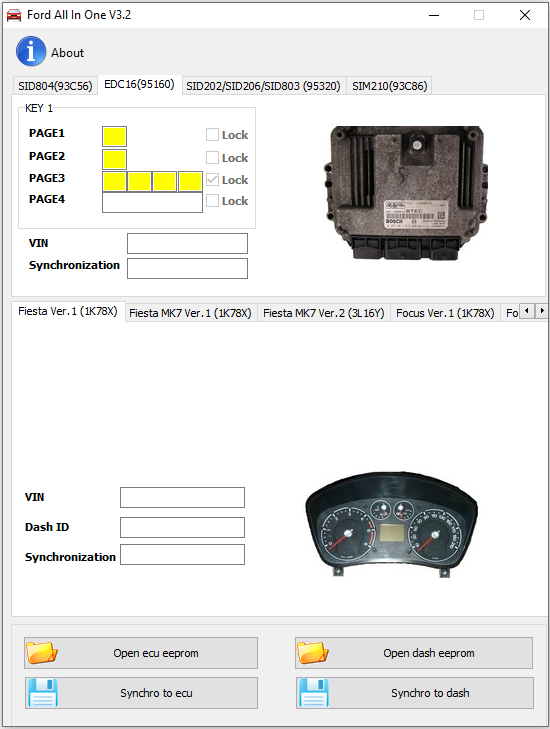
  • 【软件】福特【一车网】福特Ford All In One v3.2

    福特【一车网】福特Ford All In One v3.2

    福特【一车网】福特Ford All In One v3.2

    福特【一车网】福特Ford All In One v3.2

    支持的汽车:

    Ford Transit Connect 2005-2010, Ford Fiesta 2006-2009, Ford Fusion 2006-2009, Ford Mondeo 2008+, Ford Galaxy 2008+, Ford S-max 2008+

    支持的 ECU:

    SID804, EDC16, SID206, SID202, SID803, SIM210

    防盗器在 Ford Transit Connect 2005-2010、Ford Fiesta 2006-2009、Ford Fusion 2006-2009 上的工作原理:

    这些汽车上的防盗器数据 (PATS) 存储在仪表盘 (IC) HC12 处理器中。
    仪表盘接收来自防盗线圈的应答器密钥信号,如果密钥数据等于汽车,则IC将同步信号发送到电机ECU。
    如果应答器密钥存储在IC中,并且IC-ECU的同步数据正确,则ECU允许启动发动机。

    如果汽车应答器钥匙丢失:

    通过 OBDII 使用 CarProg 仪表盘 EEPROM 读取(或者您可以从汽车中移除 IC 并使用任何编程器(如 CarProg、XPROG 或 UPA)读取 HC12 处理器 EEPROM),保存文件并使用“打开 IC 转储”打开它。程序将向您显示应答器数据。使用任何应答器编程器(如 RW2、Codereader 或 Zedbull)将此数据写入 EH2 或 TPX4 应答器。

    如果防盗灯亮起,则电机 ECU 有缺陷/丢失:

    通过 OBDII 使用 CarProg 仪表盘 EEPROM 读取(或者您可以从汽车中移除 IC 并使用任何编程器(如 CarProg、XPROG 或 UPA)读取 HC12 处理器 EEPROM,保存文件并使用“打开 IC 转储”打开它。打开ECU(SID804,EDC16,SID206,SIM210)并读取EEPROM(使用CarProg,您可以在电路中读取)。使用“打开ECU EEPROM”按钮打开文件。现在按下按钮 Synchro 到 ecu(如果要将数据从仪表板传输到 ecu)或 Synchro 到 Dash(如果要将数据从 ecu 传输到达折号)并将保存的文件写入 dash(如果您完成了 synchro 到 dash)或 ecu(如果您完成了 synchro 到 ecu)。

    防盗器在福特蒙迪欧 2008+、Galaxy 2008+、S-max 2008+ 上如何工作:

    这些汽车上的防盗器数据 (PATS) 存储在位于乘客舱保险丝盒中的智能配电模块 (GEM) 中。GEM接收来自防盗线圈的应答器密钥信号,如果密钥数据等于汽车,则GEM将同步信号发送到电机ECU。如果应答器密钥存储在 GEM 中并且同步数据 GEM-ECU 正确,则 GEM 允许启动发动机。

    如果汽车应答器钥匙丢失:

    1.从汽车上拆下GEM(智能配电模块)。
    2. 打开并找到 25320 EEPROM。读取(使用 CarProg,您可以在电路中读取)。
    3. 保存文件并使用“Open GEM EEPROM”打开。程序将向您显示应答器数据。
    4. 使用任何应答器编程器(如 RW2、Codereader 或 Zedbull

    )将此数据写入 EH2 或 TPX4 应答器 如果电机 ECU 有缺陷/丢失:

    1.从车上拆下GEM(智能配电模块)。
    2. 打开并找到 25320 EEPROM。读取(使用 CarProg,您可以在电路中读取)。
    3. 保存文件并使用“Open GEM EEPROM”打开。
    4. 打开ECU并读取EEPROM。
    5.使用“打开ECU EEPROM”按钮打开文件。
    6. 现在使用按钮 Synchro 将同步数据从 GEM 传输到电机 ECU。
    7. 保存ECU文件并将其写回发动机控制模块

  • 【Software】Odis【vwodis】Odis S 7.2.1 Update_ODIS-Service_7.2.1-EU_Postsetup_70201.101.4100-Updated on April 9

    Odis【vwodis】Odis S 7.2.1 Update_ODIS-Service_7.2.1-EU_Postsetup_70201.101.4100-Updated on April 9

    Odis【vwodis】Odis S 7.2.1 Update_ODIS-Service_7.2.1-EU_Postsetup_70201.101.4100-Updated on April 9

    Odis【vwodis】Odis S 7.2.1 Update_ODIS-Service_7.2.1-EU_Postsetup_70201.101.4100-Updated on April 9

  • 【软件】Odis【一车网】Odis S 7.2.1 Update_ODIS-Service_7.2.1-EU_Postsetup_70201.101.4100-4月1日更新【国内首发】

    Odis【一车网】Odis S 7.2.1 Update_ODIS-Service_7.2.1-EU_Postsetup_70201.101.4100-4月1日更新【国内首发】

    Odis【一车网】Odis S 7.2.1 Update_ODIS-Service_7.2.1-EU_Postsetup_70201.101.4100-4月1日更新【国内首发】

    Odis【一车网】Odis S 7.2.1 Update_ODIS-Service_7.2.1-EU_Postsetup_70201.101.4100-4月1日更新【国内首发】