大众MQB平台Mib3.0 CNS3.0 3GB035866B固件0674最新版本
大众MQB平台Mib3.0 CNS3.0 3GB035866B固件0674最新版本
大众MQB平台Mib3.0 CNS3.0 3GB035866B固件0674最新版本
本固件是工厂固件,非外面卖的改版本号的假货,买到假货的升级死机。
大众MQB平台Mib3.0 CNS3.0 3GB035866B固件0674最新版本
大众MQB平台Mib3.0 CNS3.0 3GB035866B固件0674最新版本
大众MQB平台Mib3.0 CNS3.0 3GB035866B固件0674最新版本
本固件是工厂固件,非外面卖的改版本号的假货,买到假货的升级死机。
大众MQB平台Mib3.0 CNS3.0 3GB035866B固件0674最新版本
大众MQB平台Mib3.0 CNS3.0 3GB035866B固件0674最新版本
大众MQB平台Mib3.0 CNS3.0 3GB035866B固件0674最新版本
本固件是工厂固件,非外面卖的改版本号的假货,买到假货的升级死机。
大众奥迪斯柯达西亚特FL_1S0907159___0003_UNLOCKED.odx固件-FL_1S0907159___0003_UNLOCKED.odx Frimware
大众奥迪斯柯达西亚特FL_1S0907159___0003_UNLOCKED.odx固件-FL_1S0907159___0003_UNLOCKED.odx Frimware
大众奥迪斯柯达西亚特FL_1S0907159___0003_UNLOCKED.odx固件-FL_1S0907159___0003_UNLOCKED.odx Frimware
大众奥迪斯柯达西亚特FL_1S0907159___0003_UNLOCKED.odx固件-FL_1S0907159___0003_UNLOCKED.odx Frimware
大众奥迪斯柯达西亚特FL_1S0907159___0003_UNLOCKED.odx固件-FL_1S0907159___0003_UNLOCKED.odx Frimware
大众奥迪斯柯达西亚特FL_1S0907159___0003_UNLOCKED.odx固件-FL_1S0907159___0003_UNLOCKED.odx Frimware
5053 VCDS 22.9.0 + Loader
5053 VCDS 22.9.0 + Loader
5053 VCDS 22.9.0 + Loader
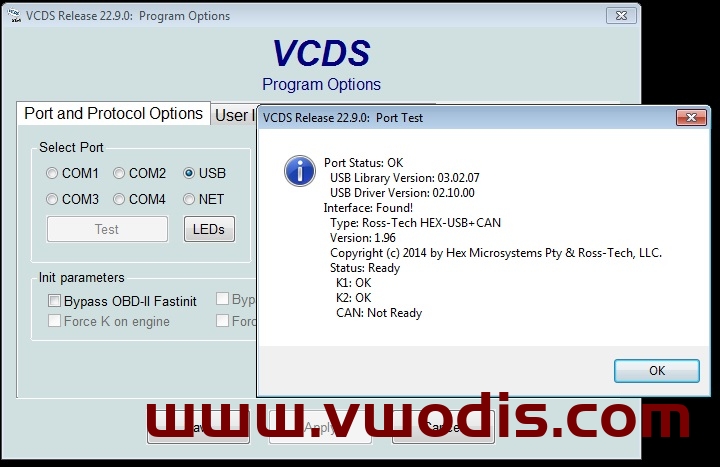
5053 VCDS 22.9.0 + Loader
5053 VCDS 22.9.0 + Loader
5053 VCDS 22.9.0 + Loader
If you have an RCD330 6RD 035 187A:
DO NOT install this on a Noname RCD330 187A! Those devices do not have enough RAM, 256mb (187A) vs 512mb (187B). If you do install this, you will get an infinite bootloop due to not having enough RAM. This can only be solved by opening the machine up, and using a TTL connection to reflash it OR soldering in a new 512mb RAM chip that basically turns it into a 187B.
Fixes: Fixes wireless Carplay dongle (i.e. Carlinkit) connection issues. Different startup logo. Otherwise seems to be the same as 5532.
Languages: English (US), Spanish (Mex), Portuguese (BR) and Russian
How to update a Noname RCD330 187B-F:
*USE A USB 2.0 THUMBDRIVE FOR BEST RESULTS*
1. Turn on the Radio and hold the Setup button for 5-10 seconds.
2. When the screen comes up, select firmware update and select the firmware file you want to use.
3. Updating can take a long while, it can get stuck on 5% or 40% for a long minute. Do not worry. Do not turn anything off, please wait patiently.
4. The radio will reboot once it is finished.
If you have an RCD330 6RD 035 187A:
DO NOT install this on a Noname RCD330 187A! Those devices do not have enough RAM, 256mb (187A) vs 512mb (187B). If you do install this, you will get an infinite bootloop due to not having enough RAM. This can only be solved by opening the machine up, and using a TTL connection to reflash it OR soldering in a new 512mb RAM chip that basically turns it into a 187B.
Fixes: Fixes wireless Carplay dongle (i.e. Carlinkit) connection issues. Different startup logo. Otherwise seems to be the same as 5532.
Languages: English (US), Spanish (Mex), Portuguese (BR) and Russian
How to update a Noname RCD330 187B-F:
*USE A USB 2.0 THUMBDRIVE FOR BEST RESULTS*
1. Turn on the Radio and hold the Setup button for 5-10 seconds.
2. When the screen comes up, select firmware update and select the firmware file you want to use.
3. Updating can take a long while, it can get stuck on 5% or 40% for a long minute. Do not worry. Do not turn anything off, please wait patiently.
4. The radio will reboot once it is finished.
Audi BNav 5.34.2 West 2022+Audi BNav 5.34.2 East 2022 Map
Audi BNav 5.34.2 West 2022+Audi BNav 5.34.2 East 2022 Map
Audi BNav 5.34.2 West 2022+Audi BNav 5.34.2 East 2022 Map
Audi BNav 5.34.2 West 2022+Audi BNav 5.34.2 East 2022 Map
Audi BNav 5.34.2 West 2022+Audi BNav 5.34.2 East 2022 Map
Audi BNav 5.34.2 West 2022+Audi BNav 5.34.2 East 2022 Map